Transparent clock weather Pro
MACHAPP Software LtdWeather
4.11.61K Reviews
- Version
- 9.06.0
- Installs
- 100.00K
- Age Rating
- Everyone
Screenshots
Our Review of Transparent clock weather Pro
 Analysis by Appyee
I like weather apps most when they answer a simple question without making me open several screens: should I take a jacket, leave earlier, or expect the afternoon to change? Transparent clock weather Pro combines a clock and weather information with home-screen widgets, so its appeal is practical as well as visual. My main advice is to treat the widget as a quick planning aid, then open the app when you need more detail; a glance at the home screen is useful, but it is not a substitute for checking a forecast before a weather-sensitive trip.
Where it fits in a daily routine
The most useful way to approach this app is as a home-screen tool rather than a weather service you need to study for its own sake. If you check the time whenever you pick up your phone, a weather display beside it can make the same glance answer two questions at once. That is especially handy before commuting, walking the dog, or deciding whether to hang laundry outside.
For example, I would check the widget while getting ready, notice the forecast and wind information, and decide whether a light layer is sensible. If the plan involves a long drive or an outdoor event, I would still open the forecast and look at the hours around the trip. The widget helps me notice conditions; the fuller view is where I would make a more considered decision.
That distinction matters because weather forecasts are estimates, and a polished display can make information feel more certain than it is. I find the app most helpful for ordinary choices, not for treating a single number as a guarantee. When timing matters, checking again closer to departure is a sensible habit with any weather app.
Choosing a widget that stays useful
Customization is not just decoration here. A widget that is too busy can make the home screen harder to scan, while one that is too minimal may leave out the detail that helps you plan. I would start with the smallest layout that shows the time and the weather information I actually use, then adjust its size only if I keep needing to open the app for something important.
There is a useful trade-off between visual fit and information density. A transparent look can sit comfortably over a wallpaper, but text still needs enough contrast to be readable. If the background behind the widget is highly detailed, a different wallpaper or a less transparent style may be more practical than trying to squeeze more information into the same space.
It is also worth thinking about where the widget sits. On a screen crowded with shortcuts, even a well-designed weather panel can become one more thing to overlook. Placing it where you naturally check the time makes its forecast more likely to be useful, and a restrained layout can keep it from competing with the apps you open most often.
Who is likely to appreciate it
I can see this working particularly well for someone who wants the time and local conditions visible without opening a dedicated forecast app every time. It also suits people who enjoy making their phone feel personal: widget size, colors, and layout let the weather display feel like part of the home screen instead of a generic panel dropped on top of it.
Multiple locations add a different kind of convenience. If you regularly check conditions at home and at another place, keeping both locations available can save repeated searching. A traveler can use that to compare the destination with home before leaving, while someone with family in another city may simply want an easy way to see how the day looks there.
I would be less inclined to recommend it to someone who only wants a bare forecast and has no interest in widgets or appearance. A standard weather app may be enough if you rarely check conditions, and a built-in clock or weather panel may feel simpler if you want to avoid installing a separate product. This app earns its place most clearly when you will actually use the combined clock-and-weather view.
How it compares with familiar alternatives
Compared with a basic weather app, the defining difference is the emphasis on a customizable clock-and-weather presence on the home screen. A conventional forecast app can be a better fit when you prefer to open one destination and focus on weather details, while this one makes more sense if you want information visible alongside the time. Neither approach is automatically better; it depends on whether you value a quick glance or a dedicated forecast screen.
Built-in phone widgets can be convenient because they require little setup and keep the experience familiar. The trade-off is that they may offer fewer ways to match a particular wallpaper or arrange the details you care about. Here, customization is part of the reason to choose the app, but it also means you may spend time trying layouts before settling on one that is both attractive and readable.
There is a similar choice with multi-location use. If you only need your current area, adding other places may make the interface busier without giving you much in return. If you do compare locations, it is worth keeping the list focused on places you genuinely check rather than turning the app into a catalogue you rarely use.
First Impressions and Interface
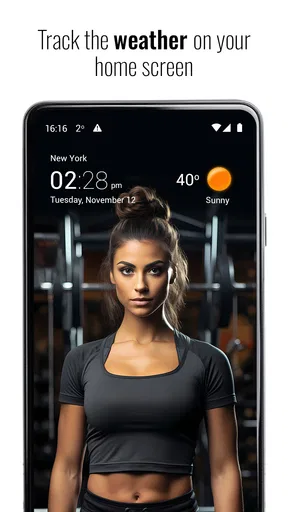
So, right off the bat, Transparent clock weather Pro is visually appealing. The interface is sleek and modern, with a transparent design that can seamlessly blend with any wallpaper on your phone. This not only makes your home screen look cool but also ensures that the app isn’t intrusive. It’s like having a personal weather station right on your screen.
Upon launching the app, you're greeted with a neat and tidy display of the clock and weather details. No clutter, just the essentials. The developers have done a fantastic job keeping it user-friendly, which is a big plus if you’re not a fan of overly complicated apps.
Features and Functionality
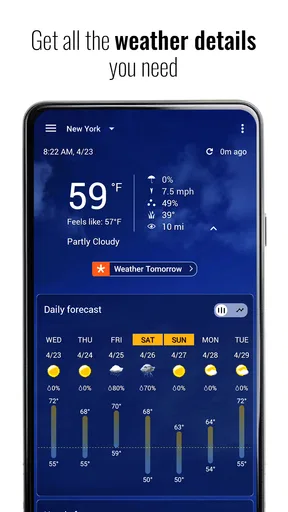
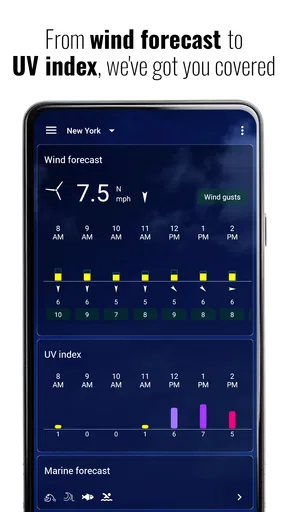
Moving on to the features, this app is not just about looks. It packs a punch under the hood. You’ve got the usual suspects—current weather, hourly forecasts, and extended forecasts—but it doesn’t stop there. The app provides additional data like sunrise and sunset times, humidity levels, and even wind speed. It’s like having a meteorologist in your pocket!
Those details are most valuable when they answer a specific planning question. Sunrise and sunset times can help when deciding whether an evening walk will still have daylight, while wind speed may change how comfortable a temperature feels outdoors. I would not try to interpret every item every day; picking the few details relevant to the plan keeps the forecast useful rather than overwhelming.
One of the standout features is the customizable widgets. You can tweak them to display exactly what you need, whether it’s a minimalistic clock or a detailed weather report. Plus, there’s a range of styles to choose from, so you can match your mood or aesthetic.
User Experience
Now, let’s talk about the user experience. Navigating through the app is a breeze. Everything is intuitive, and the menus are straightforward. I appreciate how the app doesn’t bombard you with ads, which is a rarity these days. This clean experience makes it a joy to use daily.
Additionally, the app supports multiple locations. If you’re a frequent traveler or just someone who likes keeping tabs on the weather in different places, this feature is incredibly handy. Switching between locations is seamless, and you can add as many as you like.
A practical way to keep that feature manageable is to think of locations as a short watchlist, not a permanent archive. Keep the places you compare often, such as home and a regular destination, easy to find. Before a trip, check the destination directly and then remove or ignore places that no longer help with a decision. That small bit of housekeeping makes switching more purposeful.
Performance and Reliability
Performance-wise, the app is solid. It doesn’t lag or crash, which is crucial for something you rely on for real-time information. The weather data updates frequently, ensuring you always have the latest info at your fingertips. I’ve found it to be pretty accurate, which is essential when you’re planning your day around the weather.
For an everyday forecast, I would use it to guide flexible decisions rather than assume conditions will stay unchanged. A morning glance can help with clothing or errands, but plans several hours away deserve another look later. That is a sensible workflow for any forecast, especially when a sudden change would affect whether you travel or stay outdoors.
Battery consumption is another concern with such apps, but thankfully, Transparent clock weather Pro is light on battery usage. You can leave it running in the background without worrying about it draining your phone’s juice.
Customizability and Extras
If you love personalizing your apps, you’re in for a treat. The level of customization available is impressive. From altering widget sizes to changing the layout and colors, you can tailor the app to fit your style. Plus, there are themes to choose from, allowing the app to look right at home on any device.
Lastly, for those who love sharing, the app includes options to share weather updates with friends and family. It’s a nice touch that adds a bit of social interaction to the mix.
Price, version, and what to weigh
There is a meaningful cost decision before installing: the app is listed at $10.99, with in-app purchases ranging from $4.99 to $15.99 per item. I would compare that commitment with how often I use its widget and customization options, rather than paying simply because the design looks appealing. If a built-in widget already covers your routine, the extra flexibility may not be worth the spend for you.
The app is made by MACHAPP Software Ltd, is rated for Everyone, and its current version is 9.02.1. It has been available since November 8, 2015, so this is an established product rather than a brand-new weather experiment. Its average rating is 4.2 from around 19,000 ratings, with about 1,600 written reviews and over 100,000 installs. Those figures suggest a continuing audience, but they cannot tell you whether its style or forecast presentation will suit your own habits.
For someone considering an older phone, the minimum operating-system requirement is version 7.0. The practical question is less about the number itself and more about whether the app fits the device and home screen you use today. If you are choosing it mainly for a particular widget look, check that the available layout is comfortable on your screen before committing to a paid app.
What to expect as an existing user
If you already use it, the sensible way to judge a version change is by the parts of the experience you rely on: whether your preferred widget remains readable, whether your locations are easy to reach, and whether the forecast still fits your routine. The current version gives a clear point of reference, but a version number by itself does not tell me what has changed between releases, so I would avoid assuming a particular redesign or new capability.
For an existing setup, I would make changes deliberately rather than rebuilding everything at once. If a widget’s appearance or information density feels different after an update, revisit its size and contrast first; those are the adjustments most likely to restore a useful glance. Keep the forecast workflow simple until you know whether the current arrangement still answers your daily questions.
New users can take the opposite approach: begin with one location and one uncluttered widget, then add detail only when a real need appears. That reduces setup friction and makes it easier to tell whether the app’s main strength—putting clock and weather together—actually earns space on the home screen.
Limits worth keeping in mind
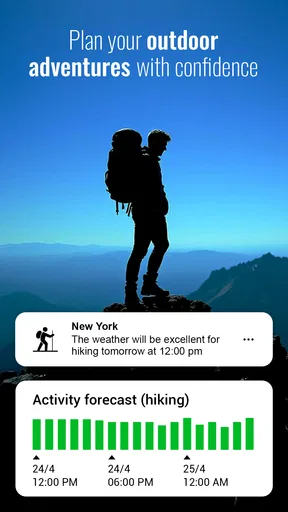
The main trade-off is that a customizable weather widget is only helpful if you enjoy maintaining its appearance and using it regularly. Someone who wants the fastest possible answer may prefer the phone’s default weather view, while someone who needs to compare detailed conditions for a specialized outdoor activity may want a service focused specifically on that task. I would not choose this app solely on the assumption that a polished widget guarantees the best forecast for every situation.
Transparency also has a practical limit: a widget needs to remain legible against whatever sits behind it. If a wallpaper makes the clock or weather details difficult to read, the aesthetic benefit is no longer helping. I would prioritize contrast and at-a-glance clarity over a perfectly blended look, particularly when checking the screen outdoors or in a hurry.
My recommendation is therefore conditional. If you want weather and time together, enjoy shaping your home screen, and will use more than one location or forecast detail, this app has a clear role. If you only check the weather occasionally, prefer a no-cost built-in option, or do not care about widget styling, a simpler alternative may be a better match.
In conclusion, Transparent clock weather Pro is a robust and stylish app that does more than just tell time and weather. It’s a blend of functionality and aesthetic appeal, making it a must-have for anyone wanting a reliable weather and clock widget. Whether you’re a weather enthusiast or just someone looking for a clean and useful home screen addition, this app is worth checking out.
Head over to the app store and give it a whirl—I’m sure you’ll find it as handy as I did. Happy weather watching!
Verdict
Strengths of Transparent clock weather Pro
- Highly customizable widget options.
- Accurate weather forecasts.
- Ad-free experience.
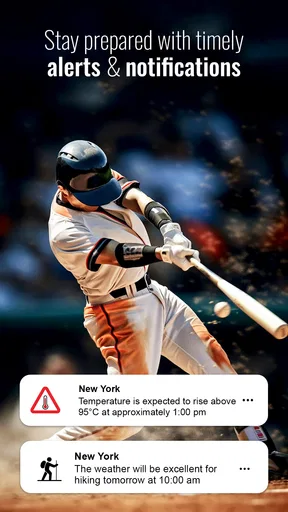
- Useful weather alerts.
- Supports multiple locations.
Limitations of Transparent clock weather Pro
- Paid app, no free version.
- Occasional minor bugs.
- Interface may feel cluttered.
- Limited widget size options.
- Requires regular updates.
Other Releases by MACHAPP Software Ltd
View All
Transparent clock and weather
Weather4.2

Sense Flip Clock & Weather
Weather4.2

Sense V2 Flip Clock & Weather
Weather4.2

Sense flip clock & weather Pro
Weather4.3
Similar Picks in This Category
View All
Weather - By Xiaomi
Xiaomi Inc.4.1

Weather & Radar Forecast
WetterOnline4.8

Weather
OneLouder Apps4.6

AccuWeather: Weather Radar
AccuWeather3.6

The Weather Channel - Radar
The Weather Channel4.6

1Weather Forecasts & Radar
OneLouder Apps4.3
Frequently Asked Questions
What are the main features of Transparent Clock Weather Pro?
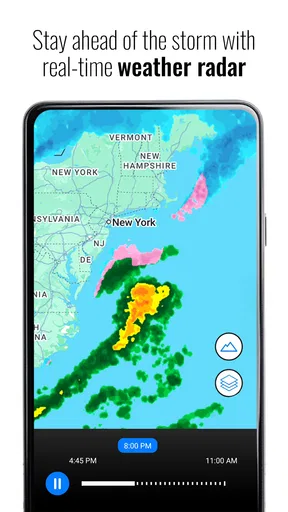
Transparent Clock Weather Pro offers a sleek interface with customizable widgets, accurate weather forecasts, and detailed weather information. Users can access hourly and daily forecasts, weather alerts, and even sunrise and sunset times. Additionally, the app supports various themes and includes features like moon phases and radar maps.
Is Transparent Clock Weather Pro ad-free?
Yes, Transparent Clock Weather Pro is an ad-free application, providing a seamless and uninterrupted user experience. Unlike many free weather apps, this Pro version eliminates distractions, allowing users to focus solely on accessing weather information and enjoying the app's clean aesthetic without interruption.
Can I customize the widgets in Transparent Clock Weather Pro?
Absolutely! Transparent Clock Weather Pro offers extensive customization options for its widgets. Users can choose different sizes, styles, and transparency levels to match their home screen. The app also allows you to select the information displayed, such as time, weather details, and location, tailoring the widget to your preferences.
Does Transparent Clock Weather Pro require an internet connection?
While Transparent Clock Weather Pro needs an internet connection to update weather data, it can display previously downloaded information offline. However, for the most accurate and up-to-date forecasts, it is recommended to have a regular internet connection to refresh the data periodically.
Is there support for multiple locations in Transparent Clock Weather Pro?
Yes, the app supports tracking weather for multiple locations. Users can easily add, remove, or switch between different locations to view weather conditions and forecasts. This feature is particularly useful for travelers or those who want to monitor the weather for family and friends in different areas.
